
Invoicing & Payments
Get paid on time, without ever asking twice.
Payment plans that bill themselves, reminders that keep their cool, and one ledger for every dollar moving through your studio.
Invoice #2481
Ivy & Theo — Fall Wedding
0%
Fewer overdue balances after 90 days
0 days
Average reduction in time-to-paid
0.0 hrs
Billing admin saved per booking
Invoicing software for photographers
What photography invoicing software actually has to do
Photography invoicing software creates, sends and collects payment for shoots — but a studio needs more than a generic invoice tool. It has to hold a non-refundable retainer, split a balance into installments across a twelve-month engagement, charge a saved card on the right date, add gratuity and sales tax correctly, and keep every dollar attached to the event it belongs to.
Pixifi does that as part of the same record that holds the lead, the proposal, the signed contract, the shoot schedule and the delivery. When a contract comes back signed, the retainer invoice already exists. When the retainer clears, the date is booked. When the final installment is charged, the gallery unlocks. There is no export, no re-keying of client details into a second app, and no month where the invoicing tool and the calendar disagree about what a wedding actually cost.
It is built for working studios: wedding photographers carrying long timelines and large balances, portrait and family studios running high volume at small ticket sizes, commercial shooters invoicing an accounts-payable department, and multi-brand operations that need weddings and portraits billed under separate identities with separate books.
Answers, quickly
- Does Pixifi take a percentage of my payments?
- No. Pixifi charges a flat monthly subscription and never takes a cut of a client payment.
- Which processors does Pixifi support?
- Stripe, Square and PayPal. You connect your own accounts and money settles directly to you.
- Can a balance be split into payments?
- Yes — unlimited installments by date or milestone, charged automatically to the card on file.
- Where does the money actually land?
- In your processor account, on your processor's normal payout schedule. Pixifi never holds funds.
One booking, five billing moments, zero of your time.
Here's the sequence Pixifi runs the moment a contract comes back signed.
Contract signed
Retainer invoice fires automatically, card saved on file.
Plan scheduled
Balance split into three payments across the timeline you set.
Reminder sent
Branded email + SMS nudge with a one-tap pay link.
Auto-charge
Card on file is billed, receipt delivered, ledger updated.
Balance cleared
Gallery unlocks only when the account is settled.
Payment processors
Bring your own processor. Keep your own rate.
Pixifi does not resell payments. You connect the accounts you already have — or open one in an afternoon — and Pixifi handles the invoicing, scheduling and reconciliation around them. Run more than one at a time, and route each studio brand to its own processor if your books need them separate.
Prefer a merchant account you already hold? Record cash, check and bank-transfer payments manually and they reconcile against the same invoice, so your reporting stays complete whichever way a client chooses to pay.
Zero payment fees
Pixifi never takes a cut of your booking.
A lot of studio tools quietly price themselves as a percentage of what you collect, which means the better your season goes, the more you hand over. Pixifi charges a flat monthly subscription. Your processor charges its standard rate. That is the entire cost of getting paid.
- No percentage of invoices, retainers or tips
- No per-transaction surcharge on top of your processor
- No platform hold on your funds — payouts go straight to your account
- The same price whether you shoot twelve weddings or a hundred
Everything your books need, built into the booking.
Payment plans that bill themselves
Split any balance into installments by date or milestone. Cards on file are charged automatically — no invoice-chasing, no awkward texts.
Reminders that never forget
Escalating email and SMS nudges before and after the due date, in your voice, with a pay link that works on a phone in one tap.
Retainers, tips and taxes handled
Non-refundable retainers, gratuity lines, discounts and per-jurisdiction tax rules all calculate themselves on the invoice.
Multi-brand accounting
Run weddings, portraits and commercial under separate brands with their own invoices, processors and reports.
Invoices that look like your studio
Your logo, type and colors on every invoice, receipt and payment page — rendered clean on desktop and mobile.
Secure by default
SSL encryption, tokenized cards through your processor, two-factor authentication and a full audit trail on every transaction.
Invoicing by photography style
Billing built for how your genre actually gets paid.
A wedding balance and a mini-session deposit are not the same problem. Here's how Pixifi handles money for the six studio types that run on it most.

Wedding photographers
Bookings close a year out, then the balance sits there until someone chases it.
Retainer collects at signing, the balance splits into auto-billed installments, and the gallery only unlocks once the account is settled.

Portrait & family studios
High volume, small tickets — manual invoicing costs more than the session earns.
The deposit is taken inside the booking flow, the card stays on file, and receipts send themselves for every mini-session on the calendar.

Newborn & maternity
Dates move constantly, and session fees blur into print and product balances.
Payment plans survive reschedules without re-invoicing, and session fees, products and gratuity stay on separate lines of the same ledger.

Senior & school
A season's worth of orders lands in a few weeks, all from different parents.
Batch invoices go out at once with parent-friendly email and SMS pay links, and every order's payment status is tracked in one view.

Commercial & event
Your client has an accounts-payable department, a PO number and net-30 terms.
Branded estimates convert straight to invoices with reference fields, usage line items, taxes and due dates finance teams can actually process.

Multi-brand studios
Two or three brands, two or three sets of books, one very tired owner.
Each brand invoices under its own logo and processor account, while revenue reporting rolls up across all of them under a single login.
See it in the product.
The same screens your clients and your team use every day — booking on the front end, pipeline on the back end.
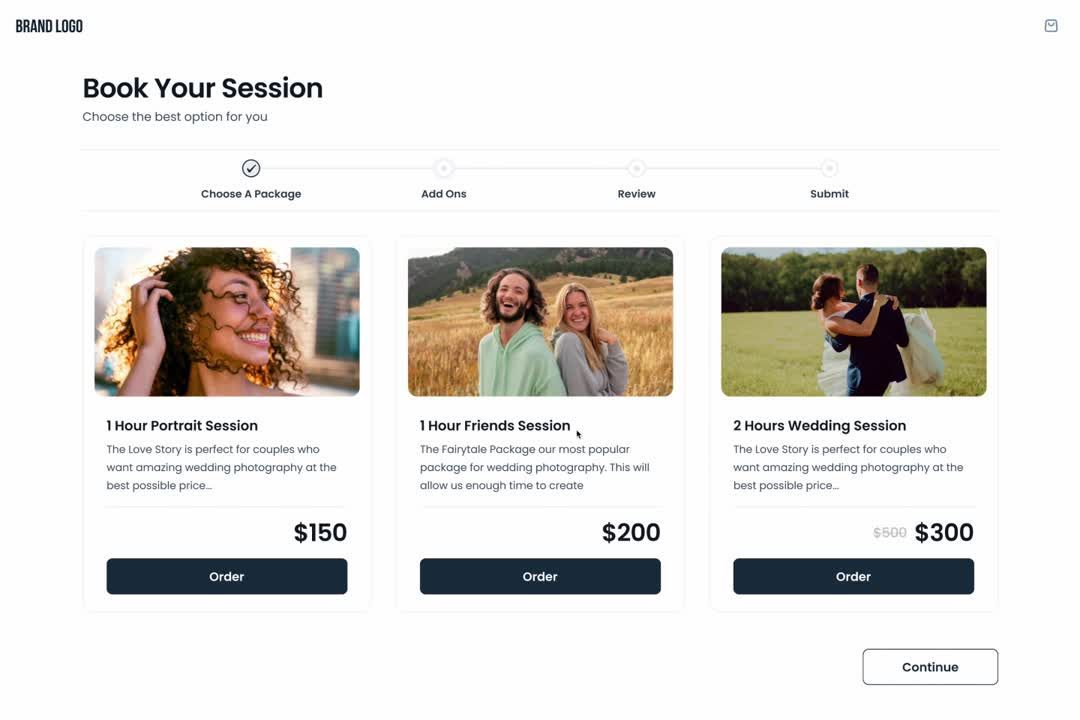
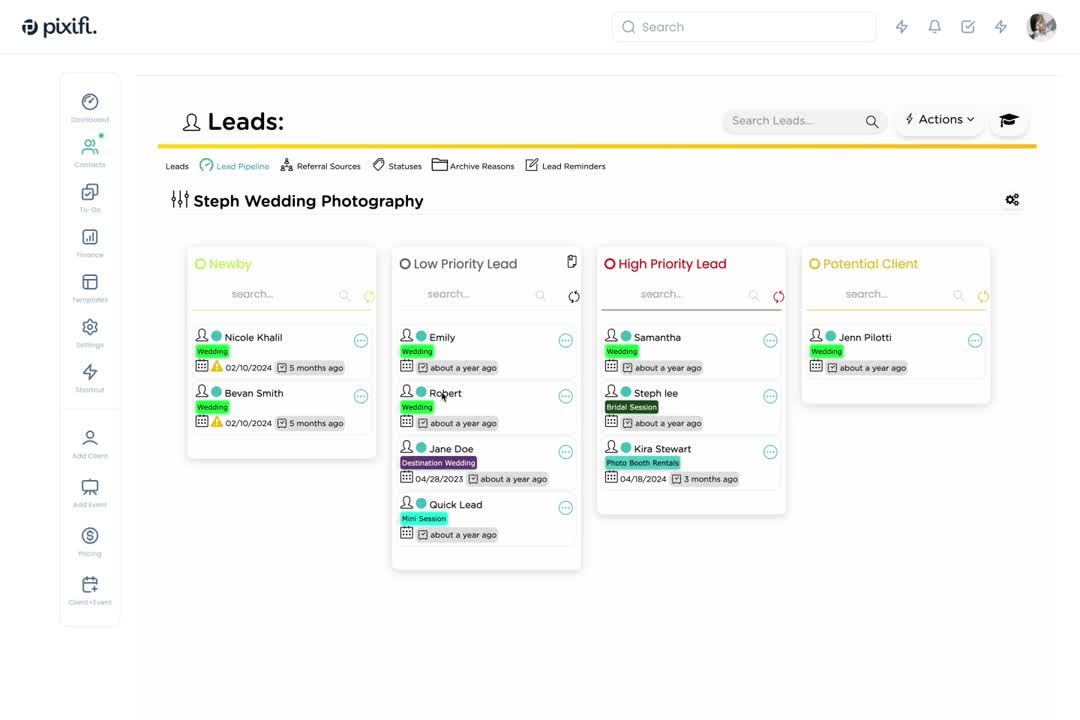
One system of record
Billing belongs on the same record as the booking.
A standalone invoicing app knows a name and an amount. It does not know the event date, the second shooter, the signed terms or the delivery deadline — so it cannot trigger anything, and neither can you without doing it by hand.
Inquiry
Lead record created, source tagged
Proposal
Packages and add-ons priced
Contract
E-signed, terms locked
Invoice
Retainer fires automatically
Payment plan
Installments scheduled and charged
Delivery
Gallery unlocks on a settled balance
What breaks when billing is bolted on
- Client details typed twice, and spelled two different ways
- An invoice total that no longer matches the signed contract
- Automations that cannot fire, because billing lives in another app
- Reporting that never reconciles across tools at tax time
- No single answer to 'what does this client still owe?'
What one ecosystem gives you instead
- One client record carrying every quote, contract and dollar
- Automations that fire off payment events — paid, overdue, failed
- A client portal where the balance, documents and pay link live together
- Reports that tie revenue back to lead source, brand and shoot type
- A clean hand-off to staff, because nothing lives only in your head
Reporting & reconciliation
Know what you are owed, always.
Because payments post against the event, the reporting is a by-product of running your studio rather than a spreadsheet you maintain on Sundays.
Outstanding balances at a glance
Every unpaid invoice, what stage it is at, how overdue it is and which reminder went out last — sorted so the money you are owed is never a research project.
Revenue by brand, genre and lead source
See what weddings earned versus portraits, which package sells, and which referral partner is actually worth the coffee. Filter by any date range you need.
Tax and gratuity handled on the invoice
Per-jurisdiction tax rules, taxable and non-taxable line items, tips and discounts all calculate on the document so the number you report is the number you charged.
Exports your bookkeeper will accept
Pull invoices, payments and refunds out as a clean file, or push through to QuickBooks so your books are built continuously instead of in one painful January weekend.
How it compares
Pixifi, a standalone invoicing app, or a spreadsheet
| What you need | Pixifi | Standalone invoicing app | Spreadsheet + processor dashboard |
|---|---|---|---|
| Cut of your payments | None — flat monthly subscription | Often a percentage on top of the processor | None, but you do the work |
| Client data | One record: lead, contract, shoot, invoice | A separate contact list to keep in sync | Retyped into every tool, every time |
| Payment plans | Unlimited installments, auto-charged | Sometimes, usually manual | A calendar reminder and good intentions |
| Reminders | Automatic email and SMS on your cadence | Generic, off-brand nudges | You, writing an awkward email |
| Multi-brand billing | Separate brands, processors and reports | One account, one identity | Two spreadsheets and a headache |
| Reporting | Revenue tied to shoots, sources and staff | Invoice totals only | Rebuilt by hand at tax time |
Payment questions
Fees, processors, payment plans, refunds and bookkeeping — the questions studios ask before they move their billing.
Invoicing & Payments
Stop being your own accounts receivable department.
Turn on payment plans and reminders in your trial and watch the overdue column empty out.